Creating a JARVIS Voice Assistant with Python and Home Automation APIs

Introduction
Since the Iron Man saga, the JARVIS voice assistant has embodied the ideal of an artificial intelligence capable of managing our environment with a simple voice command. Today, thanks to technological advances, it's possible to approach this by combining accessible tools like Python and home automation APIs. This article is aimed at digital professionals curious about customizing their assistant to automate domestic or professional tasks, relying on community projects and verified resources.
We will explore approaches to developing such a system, comparing methods with and without coding, and detailing key components like speech recognition and home automation integration. Whether you're a beginner or experienced programmer, you'll discover how to start this exciting project, drawing inspiration from initiatives shared on platforms like Medium and Reddit.

Foundations of a Custom Voice Assistant
Essential Components of a JARVIS System
To build a JARVIS-type assistant, you first need to understand its basic elements:
- Speech recognition to interpret voice commands
- Processing engine to analyze requests
- Home automation APIs to interact with external devices
- Voice command system for the user interface
Available Development Approaches
According to a Medium article, using ChatGPT can accelerate development by providing conversational intelligence, while projects on Reddit show how self-taught programmers have created their own versions with Python.
For example, a Reddit user shared their experience developing a virtual assistant to automate various tasks, using Python as the main language. This illustrates that, even without advanced resources, you can assemble a functional system by integrating libraries like SpeechRecognition for voice and REST APIs to control connected devices.
Useful analogy: See this assistant as a conductor who coordinates different instruments – here, the software and hardware components – to execute actions on simple request.
Practical Guide: Step-by-Step Implementation
Basic Setup with Python
Here are the essential steps to start your custom voice assistant:
- Install essential Python libraries:
- `speech_recognition` for speech recognition
- `pyttsx3` for speech synthesis
- `requests` for API calls
- `flask` to create a web interface
- Basic code structure:
import speech_recognition as sr
import pyttsx3

# Voice engine initialization
engine = pyttsx3.init()
recognizer = sr.Recognizer()

def listen_command():
    with sr.Microphone() as source:
        print("Listening...")
        audio = recognizer.listen(source)
    try:
        command = recognizer.recognize_google(audio, language='fr-FR')
        return command.lower()
    except sr.UnknownValueError:
        return "Command not understood"
- Home automation API integration:
- Authentication token configuration
- HTTP request management to your connected devices
- Implementation of specific voice commands
Concrete Example: Lighting Control
def control_lights(command):
    if "turn on" in command and "living room" in command:
        # API call to your home automation system
        requests.post("https://api.domotique.com/lights/salon/on")
        return "Living room lights turned on"
    elif "turn off" in command and "living room" in command:
        requests.post("https://api.domotique.com/lights/salon/off")
        return "Living room lights turned off"
Recommended Technical Architecture
Optimal Modular Structure
To create a durable and scalable voice assistant, adopt a modular architecture:
Essential modules:
- Speech recognition module: Manages audio input and text conversion
- NLP processing module: Semantic analysis of commands
- API integration module: Communication with external services
- Speech synthesis module: Generation of audio responses
- State management module: Context and preference tracking
Python Architecture Example
class VoiceAssistant:
    def init(self):
        self.recognition = RecognitionModule()
        self.processing = ProcessingModule()
        self.home_automation = HomeAutomationModule()
        self.synthesis = SynthesisModule()

    def execute_command(self, audio_command):
        text = self.recognition.convert_audio_to_text(audio_command)
        intent = self.processing.analyze_intent(text)
        result = self.home_automation.execute_action(intent)
        return self.synthesis.generate_response(result)
Approach Comparison: Coding vs No-Coding
In the current ecosystem, two main paths are available to create a JARVIS: a programming-based approach, ideal for customization, and a no-coding approach, more accessible to novices.
Development Method Comparison Table
| Criterion | With Coding (e.g., Python) | Without Coding (e.g., low-code tools) |
|-------------|--------------------------------|---------------------------------------|
| Flexibility | High – Allows advanced customizations, like specific API integration | Limited – Depends on pre-built modules, according to Pikaai Vercel App |
| Complexity | Moderate to high – Requires programming skills, as mentioned on Quora | Low – Ideal for beginners, with graphical interfaces |
| Examples | Reddit projects using Raspberry Pi for home automation | Solutions like those mentioned on Pikaai Vercel App to create a basic assistant |
| Development Time | Variable – From a few weeks to several months, depending on experience | Fast – Possible in a few hours or days |
Advantages and Disadvantages of Each Approach
Python Coding Approach:
- ✅ Complete customization
- ✅ Integration with any API
- ✅ Deep technical learning
- ❌ Steeper learning curve
- ❌ Longer development time
No-Coding Approach:
- ✅ Quick start
- ✅ Intuitive user interface
- ✅ Ideal for prototypes
- ❌ Functional limitations
- ❌ Platform dependency
According to discussions on Quora, a beginner programmer might take several months to develop a basic system due to the learning curve, while no-coding tools, like those cited by Pikaai Vercel App, allow rapid prototyping of an assistant using APIs like Gemini.
Important: The fictional version of JARVIS in Iron Man remains a distant ideal, as noted on Quora, because it involves general artificial intelligence that exceeds current capabilities.
Home Automation Integration and Practical Examples
Home Automation Applications
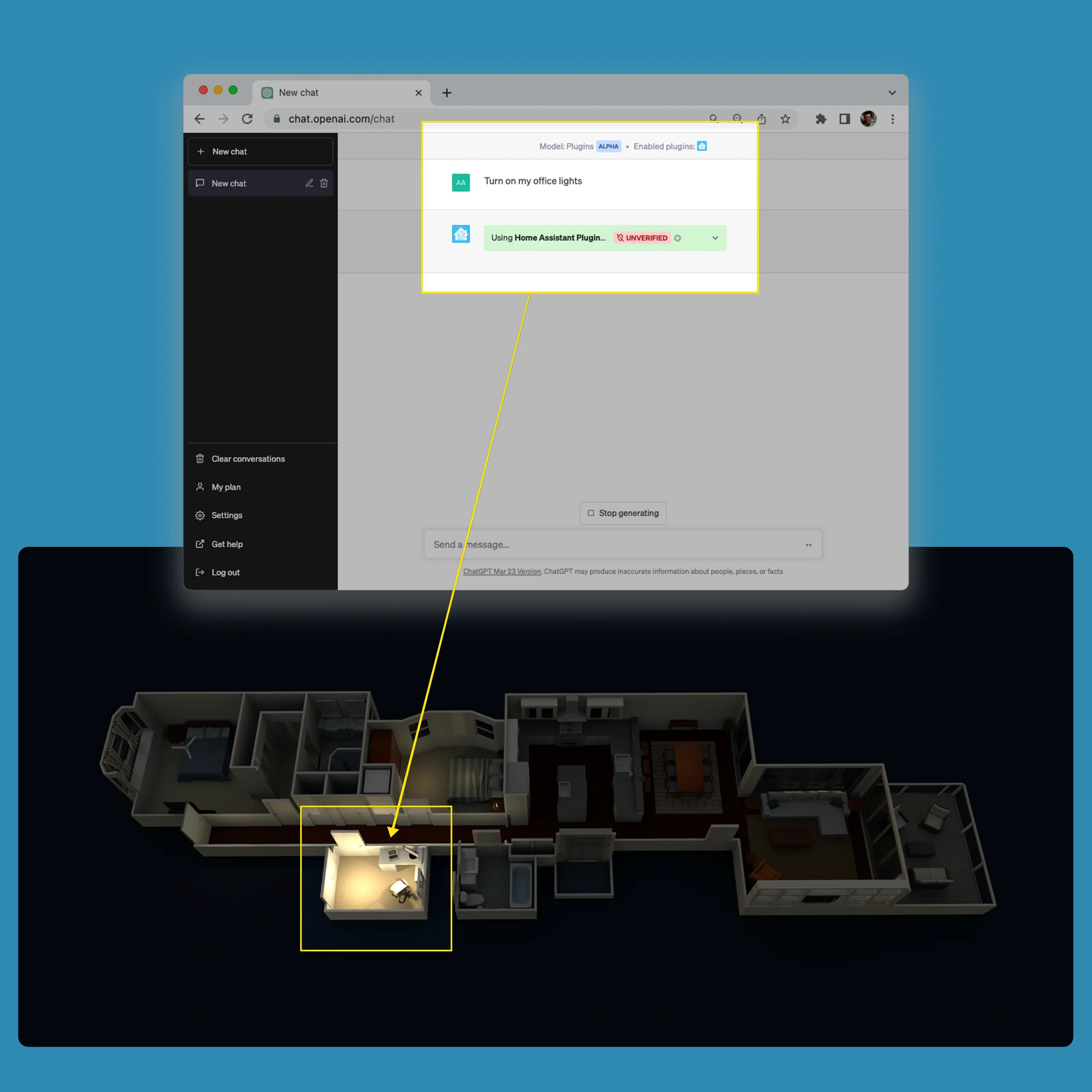
One of the most captivating aspects of a personal JARVIS is its ability to automate your environment via home automation APIs. On Reddit, users describe how to connect their assistant to systems like:
Practical home automation applications:
- Email management: Reading and sending voice messages
- Smart lighting: Voice control of lights
- Connected thermostats: Ambient temperature adjustment
- Security systems: Voice monitoring and alerts
- Media: Music and video control
Complete Practical Automation Scenario
Imagine a scenario where you say "JARVIS, turn on the living room lights and set the temperature to 21 degrees" – thanks to API integration, your Python code can:
- Analyze the voice command
- Identify the requested actions
- Send HTTP requests to the corresponding APIs
- Confirm execution with a voice response
Technical Components Needed for Integration
- `requests` module for HTTP calls to home automation APIs
- `Flask` framework to create simple interfaces
- Speech recognition libraries for speech-to-text conversion
- Specific home automation APIs (Google Home, Amazon Alexa, local systems)
- Error handling for network connections
Although sources don't provide detailed code, they emphasize the importance of these modules to transform your assistant into a true domestic project manager, capable of coordinating multiple tasks without manual intervention.
Voice Performance Optimization
Advanced Techniques to Improve Recognition
To optimize your JARVIS voice assistant, consider these advanced techniques:
Speech recognition optimizations:
- Use custom language models
- Implement real-time processing
- Add specific keyword detection
- Optimize response latency
Robust error handling:
- Implement automatic retries for APIs
- Add fallbacks for unrecognized commands
- Efficiently manage network timeouts
- Log errors for debugging
Technical Challenges and Solutions
Main Challenges and How to Overcome Them
- Imprecise speech recognition: Use noise filtering and model training with your voice
- Multiple API integration: Implement robust error handling and timeouts
- Response latency: Optimize API calls and use caching when possible
- Data security: Encrypt communications and use secure authentication
Development Best Practices for Your Assistant
- Start simple: First implement a few basic commands
- Test frequently: Check each component individually
- Document your code: Note API endpoints and configurations
- Plan for scalability: Structure your code to easily add new features
Quick Start Guide
First Steps in 30 Minutes
To immediately start your JARVIS project, follow these simple steps:
Initial setup:
- Install Python 3.8+ on your system
- Create a virtual environment with `python -m venv jarvis_env`
- Activate the environment and install basic dependencies
Speech recognition test:
- Implement the basic listening function
- Test with simple commands like "hello" or "time"
- Adjust microphone sensitivity according to your environment
First home automation integration:
- Choose a simple device to control (connected lamp)
- Configure your home automation system's API
- Test a single voice command to turn on/off
Advanced Configuration and Customization
User Experience Enhancement
To make your voice assistant more natural and effective, integrate these advanced features:
Voice Personalization:
- Adaptation to your specific voice and accent
- Creation of custom commands
- Management of conversational context
- Learning of user preferences
Advanced Integrations:
- Connection with calendars and schedules
- Synchronization with mobile applications
- Integration of weather services
- Advanced media control
Scalability Planning and Maintenance
Strategies for a Sustainable System
To ensure the longevity of your JARVIS voice assistant, adopt these architectural best practices:
Scalable Architecture:
- Separation of responsibilities: Each module should have a single function
- Centralized error management: Unified logging system
- Externalized configuration: Storage of parameters in separate files
- Automated tests: Continuous validation of functionalities
Proactive Maintenance:
- Regular updating of Python dependencies
- Monitoring of external API performance
- Backup of custom configurations
- Documentation of modifications made
Evolution Perspectives and Future Trends
Current Technological Evolutions
On Quora, it's noted that even advanced projects don't match fiction, but progress in AI, such as the use of language models, paves the way for smarter assistants. In the future, the emergence of open standards in home automation could simplify these integrations, making assistants more accessible.
Possible Evolutions for Your Personal JARVIS:
- Integration with conversational artificial intelligence
- Support for more complex contextual commands
- Machine learning to personalize responses
- Interconnection with more services and devices

Conclusion
Creating your own JARVIS is within reach for enthusiasts, whether you choose a Python-coded solution or a low-code approach. By combining voice recognition, query processing, and home automation APIs, you can automate aspects of your life while learning key technologies.
The practical examples and code provided in this article give you a solid foundation to start your custom voice assistant project. Begin with simple features and gradually extend your system's capabilities.
And if tomorrow, your assistant could anticipate your needs like in the movies, would you be ready to push the boundaries of personal automation?
To Go Further
- Medium - Guide to building a voice assistant with ChatGPT and Raspberry Pi
- Reddit - Testimony from a self-taught programmer about their custom assistant
- Quora - Discussions about feasibility and development time
- Reddit - JARVIS system project with Raspberry Pi for home automation
- Reddit - Architecture of a real voice assistant with task automation
- Pikaai Vercel App - Methods to create an AI assistant without coding
- Quora - Advice on languages and approaches for a smart assistant
- Quora - Reflections on creating an AI inspired by JARVIS